
CRM with invoicing
CRM with GST invoicing for Indian service businesses
Sales and billing are parts of the same customer relationship. WTS CRM keeps them on one record: the enquiry, the accepted quotation, the GST invoice built from it, every advance and part payment, and the balance still due, with a reminder ready when it runs late.
What goes wrong when billing sits apart from sales
Everything typed twice
The client’s name, address, GSTIN and the agreed scope are copied from the CRM or a chat into an invoice template, with a new chance of a mistake each time.
Which version was agreed?
The invoice is rebuilt from whichever copy of the quotation someone can find, and it does not match what the client accepted.
Part payments in a notebook
The advance came by UPI, half the balance by cheque, and the amount still owed is worked out from bank statements.
Nobody chases the overdue ones
Salespeople cannot see whether the client paid, and the person who can is busy with this month’s invoices.
Invoicing in WTS CRM
Invoices sit on the client record, next to the lead history, quotations and projects they belong to.
Quote to invoice
Convert an accepted quotation into a GST invoice with the same line items, or raise one directly from a client for work that was never quoted.
GST worked out for you
Add your GSTIN and business details once. Each line has an HSN or SAC code and a GST rate, and CGST and SGST or IGST are split from the place of supply.
Shared as a link
Send the invoice as a link the client opens in a browser without an account, and prints or saves as a PDF.
Advances and part payments
Record each payment with its date and method: UPI, bank transfer, cash or cheque. The invoice moves to Part paid, then Paid, and shows the balance at every step.
Overdue in view
Invoices past their due date are marked Overdue. Send a WhatsApp reminder with the amount and link already written, or turn on automatic reminder emails for overdue invoices.
Billing on the client record
Open any client and see their quotations, invoices, payments and balance beside the notes and projects, so whoever takes the call knows where the account stands.
A GST invoice with part payments recorded
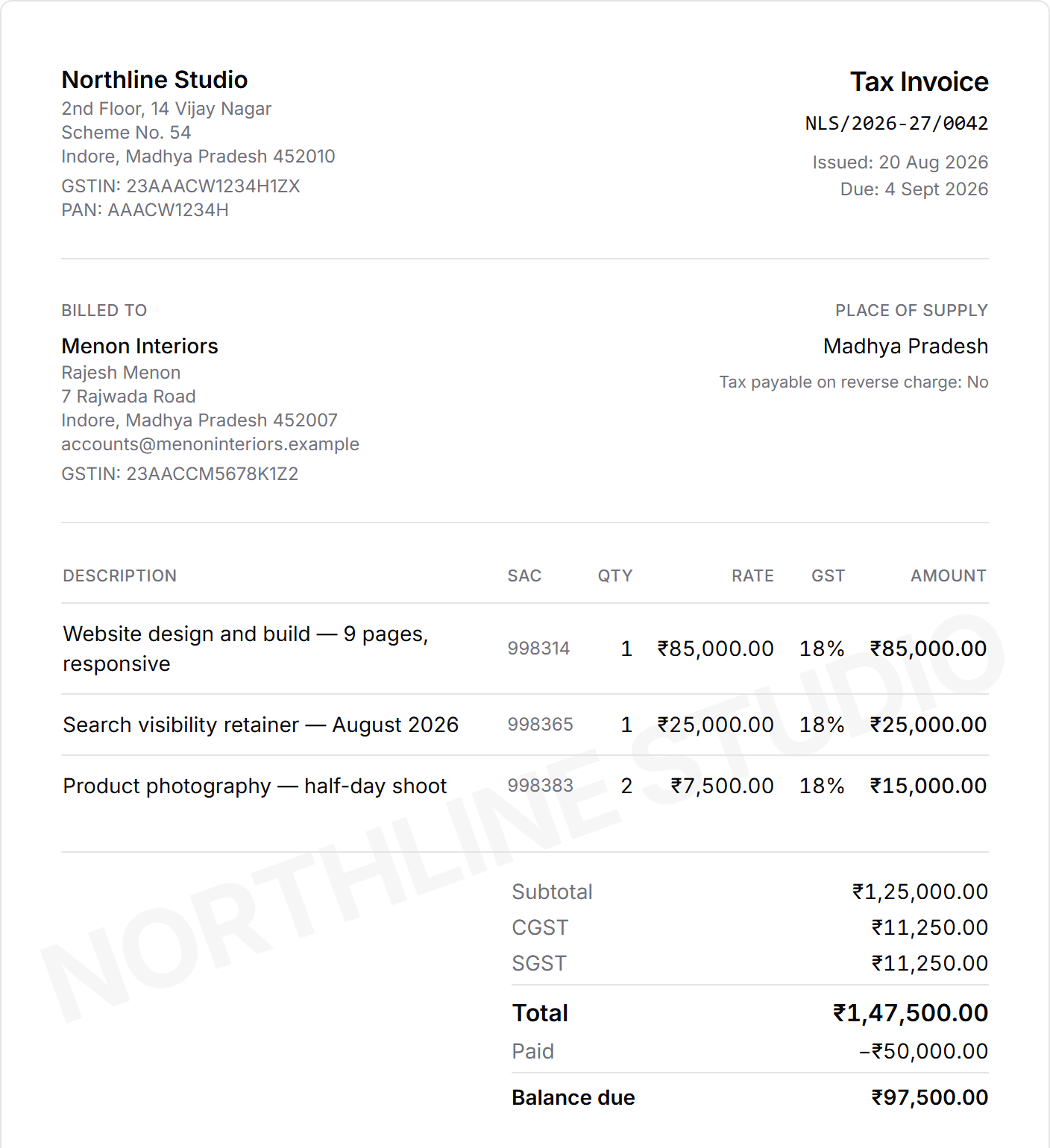
From accepted quote to cleared balance
Set up billing once
Add your business name, address, GSTIN, bank or UPI details and invoice terms in Settings.
Convert the quotation
When the client accepts, the quotation becomes an invoice with the same lines, rates and tax.
Send the link
Share the invoice by email or WhatsApp; the client can open and print it from a phone.
Record the advance
Log the first payment the day it lands. The balance updates on the invoice and the client.
Chase what is late
Overdue invoices are flagged, and a reminder goes out on WhatsApp in one click or by email automatically.
Close it out
The last payment marks the invoice Paid. Export the invoice register as CSV for your accountant.
CRM invoicing or accounting software?
They do different jobs, and many businesses use both.
| Job | WTS CRM | Accounting software |
|---|---|---|
| Quotations from a lead | Yes, with open tracking and follow-ups | Sometimes, without the sales history |
| GST invoices for clients | Yes | Yes |
| Advances and part payments | Yes, per invoice | Yes |
| Payment reminders | WhatsApp in one click, or automatic emails | Varies by product |
| Sales pipeline and follow-ups | Yes | No |
| Expenses, ledgers and bank reconciliation | No | Yes |
| GST return filing | No | Often, or through your accountant |
What an invoice needs, and what to check yourself
WTS CRM puts your details, the client’s details and GSTIN, a number, the date, the place of supply, HSN or SAC codes, taxable values and the tax split on every GST invoice. The GST invoice format guide lists what a service provider’s invoice should carry and why.
Before going live, check your GSTIN details, your tax treatment and your numbering with your accountant. Rules that depend on turnover, such as e-invoicing, are your business’s responsibility to follow; the CRM does not generate an IRN.
CRM invoicing is not full accounting
WTS CRM creates and tracks customer documents. It does not keep ledgers, record expenses, reconcile your bank or file GST returns, so your accountant may still want dedicated accounting software alongside it. Export the invoice register as CSV, one row per invoice with each tax head, whenever they ask.
There are no recurring invoices either: a monthly retainer is raised each month from the client’s record, where the earlier invoices are kept. For chasing money, see payment reminder messages and how to ask for an advance.
Who invoices from the CRM
Freelancers
One person sells, delivers and collects. See CRM for freelancers.
Agencies
Milestone and advance billing on client projects. See CRM for web development agencies.
Consultants and CA firms
Fee quotations and staged engagement invoices. See CRM for CA firms.
Contractors and installers
Advance, mid-job and completion payments on one invoice. See CRM for contractors.
What changes when invoices live in the CRM
- An accepted quotation becomes a GST invoice without retyping a line.
- CGST and SGST or IGST are worked out from the place of supply.
- Advances and part payments are recorded as they arrive, so the balance is always right.
- Overdue invoices are flagged, with a WhatsApp reminder one click away.
GST invoicing from ₹999 a month
Quotations, GST invoices, payment records and reminders come with Solo at ₹999 a month for one person, with no client limit. Team (₹2,499) adds 5 seats with roles. Starter covers leads and follow-ups only.
Solo
₹999 / month
- One owner workspace
- Unlimited clients and leads
- Projects and task tracking
- Quotations and GST invoices
- Payment records and receivables
- All core CRM features
The trial unlocks every feature for 7 days and asks for no card. Choose a plan only when it ends.
Frequently asked questions
Can WTS CRM create GST invoices?
Yes. Add your GSTIN and business details once in Settings. Each invoice works out CGST and SGST or IGST from the place of supply, with an HSN or SAC code and GST rate on each line.
Can it record part payments?
Yes. Record each payment against the invoice with its date and method (UPI, bank transfer, cash or cheque). The invoice shows Part paid and the remaining balance until it is cleared.
Can I turn a quotation into an invoice?
Yes. An accepted quotation converts into a GST invoice with the same line items, and the quotation is marked Invoiced.
Does it send payment reminders?
Yes. Overdue invoices have a WhatsApp reminder button that opens the chat with the amount, due date and link filled in, and you can turn on automatic reminder emails for overdue invoices.
Can I invoice without GST?
Yes. If you are not GST-registered, switch GST off and the invoice shows your full price without tax.
Does it generate e-invoices with an IRN?
No. WTS CRM does not connect to the e-invoice portal. If your turnover requires e-invoicing, generate the IRN through your accounting software or the portal.
Does it replace accounting software?
No. It handles customer quotations, invoices and payments. Ledgers, expenses, bank reconciliation and GST returns stay with your accountant or accounting software.