
Lead management software
Lead management software for small businesses
Enquiries arrive by phone, WhatsApp, your website and referrals. WTS CRM keeps each one as a lead with a source, a stage, an owner and a next step, in one list your whole team can search instead of a notebook, a chat thread or someone’s memory.
Why enquiries slip through
Enquiries in five places
Calls in the phone log, messages on WhatsApp, forms in email, referrals on a sticky note. There is no single list to work from.
Duplicates and half-records
The same customer is entered twice with different spellings, and the record with the phone number is not the one with the notes.
Hot and cold look the same
A list of names does not show who is ready to buy this week and who was only asking about price.
Nobody owns the lead
Without an owner, every enquiry is everyone’s job, which in a busy week means nobody’s.
What lead management looks like in WTS CRM
One record per lead
Name, company, phone, email, website, address, industry, source, tags and notes, plus up to 25 custom fields your owners or admins define.
Three ways in
Add a lead by hand, import a CSV or Excel file with column mapping, or connect your website form and other lead sources, each through its own webhook URL. See website lead capture.
Duplicate protection
Phone numbers are stored in one Indian format, and the same number cannot be added twice in a workspace, whether it is typed in or imported.
Stages and temperature
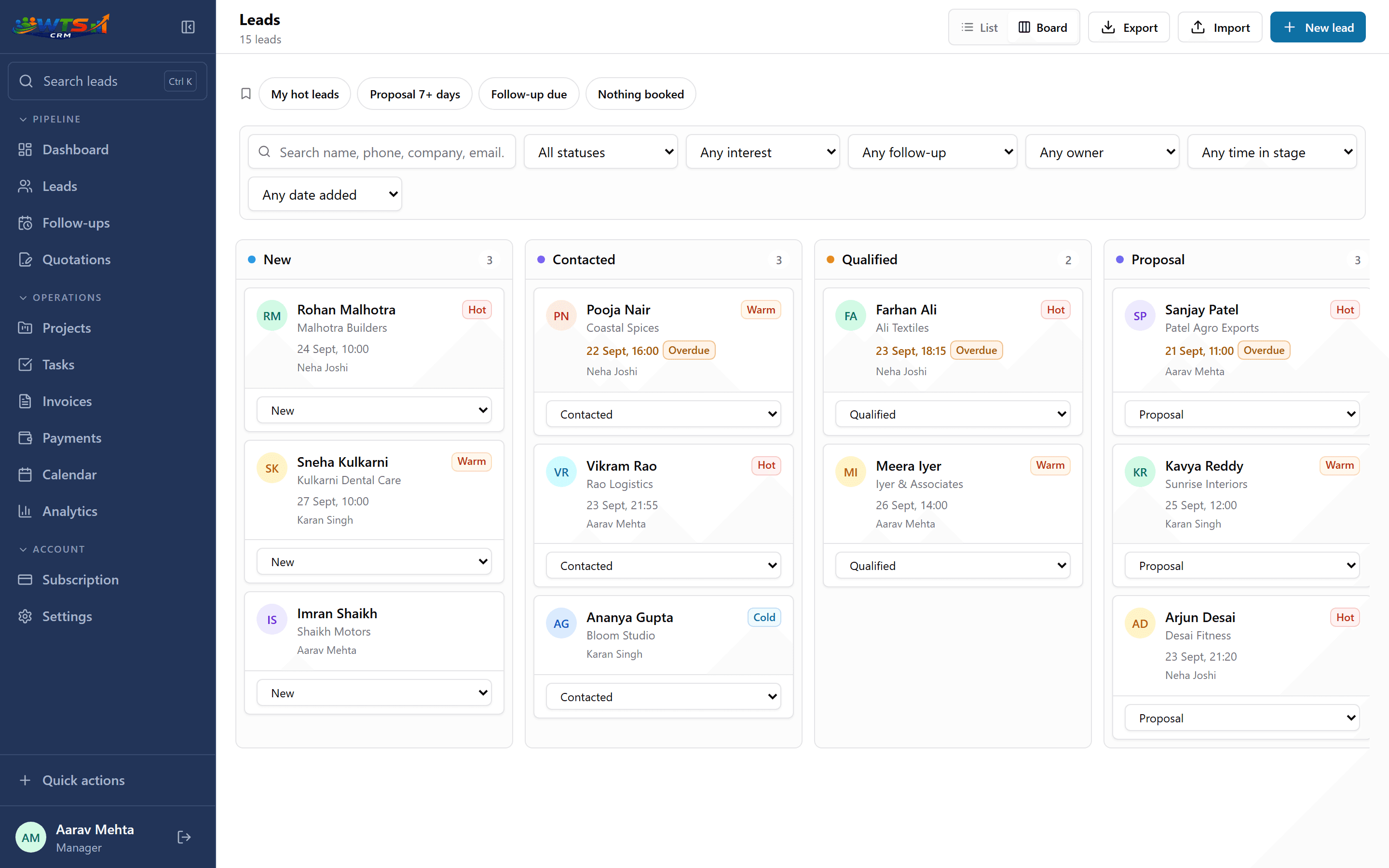
Six stages from New to Won or Lost, a hot, warm or cold rating, and how long each lead has sat in its current stage.
Saved views
One tap for My hot leads, Proposal 7+ days, Follow-up due or Nothing booked, plus up to 20 views of your own.
Owners and lost reasons
Every lead gets an owner, the person who added it unless you choose someone else. Marking a lead Lost asks why, so price, budget or a competitor shows up in your reports.
Your leads on one board
A daily lead routine
Lead management software only works if the routine around it is short enough to keep up in a busy week.
Capture
Every new enquiry becomes a lead when it arrives, with its source recorded.
Qualify
Set the stage and temperature, and note what they asked for and what they can spend.
Book the next step
Every open lead gets a dated follow-up. Moving the stage books one for you; see lead follow-up software.
Review the gaps
Start the day with the Nothing booked and Proposal 7+ days views to catch leads that have stalled.
Close it out
Won leads become clients with their history intact; lost leads keep a reason you can learn from.
What to look for in lead management software
Start with how enquiries reach you today and who answers them. The software has to accept leads from those channels without retyping, keep one record per customer, and make the next step obvious to whoever owns it.
Then check the unglamorous parts, because they decide whether the team keeps using it: how fast a lead can be added from a phone, whether duplicates are caught, and whether you can take everything with you if you leave. WTS CRM runs in the browser on a phone or laptop and exports to CSV or JSON at any time.
- Capture from the channels you actually use
- Duplicate detection on phone number
- An owner and a next step on every lead
- Views for stalled and unbooked leads
- Reasons recorded for lost deals
- Export whenever you want
What it does not do
WTS CRM has no built-in connection to Facebook or Instagram lead ads, and it does not read your WhatsApp chats. Meta leads arrive through Zapier, Make or Pabbly, or as a CSV import. Google Ads lead forms and IndiaMART connect by webhook; see how to connect your lead sources.
It is also not a marketing-automation tool: there are no email campaigns or drip sequences. It is built for the person who has to call the lead back.
Who uses it
Owners replacing a notebook or spreadsheet
Import the sheet you already have; the Excel-to-CRM guide walks through it.
Agencies sharing enquiries
Several people working one pipeline with clear ownership. See CRM for agencies.
Small sales teams
Assign leads by person and review everyone’s pipeline. See CRM for small sales teams.
Freelancers and consultants
One person, a steady flow of enquiries and no time for admin. See CRM for freelancers.
What you get from it
- Every enquiry sits in one searchable lead database, whichever channel it came from.
- The same phone number cannot become two records.
- Each lead has an owner and a next step, and the ones without are one tap away.
- You can see which stage leads stall in, and why the lost ones were lost.
Lead management from ₹499 a month
Starter covers lead tracking and follow-ups for one person with up to 100 clients and leads, for ₹499 a month. Solo (₹999) removes the limit and adds quotations, projects and invoices; Team and Agency add seats.
Starter
₹499 / month
- One user workspace
- Up to 100 clients and leads
- Lead stages, temperature and notes
- Follow-up dates and reminders
- Basic CRM dashboard
The trial unlocks every feature for 3 days and asks for no card. Choose a plan only when it ends.
Frequently asked questions
What is lead management software?
Software that keeps every sales enquiry as a record with a source, a status, an owner and a next step, so leads are worked in order rather than from memory. WTS CRM adds the follow-up schedule and the client, quotation and invoice records that come after a lead is won.
Can I import my existing leads from Excel?
Yes. Upload a CSV or XLSX file and map its columns; the preview flags invalid rows and duplicates before anything is saved.
Can leads from my website form come in automatically?
Yes. Paste the ready-made form from Settings into your site, or send your existing form to a lead source’s webhook URL. Each submission arrives as a new lead, and you can send a test from Settings. See website lead capture.
Do Facebook and Instagram lead ads come in automatically?
Not directly. Route them through Zapier, Make or Pabbly to a lead source’s webhook URL, or download the leads from Meta as a CSV and import them. The source stays on each lead.
How are duplicate leads handled?
Phone numbers are normalised, and the same number cannot exist twice in one workspace. Imports show duplicates in the preview so you can skip them.
Can I add my own fields?
Yes. Owners and admins can add up to 25 custom fields (text, number, date, dropdown or yes/no). They are searchable and included in CSV exports.
Does it work on a phone?
Yes. WTS CRM runs in the browser, so you can add a lead or check follow-ups from your phone without installing an app.