
CRM for freelancers
A simple CRM for freelancers
When you sell and deliver the work yourself, a complicated CRM becomes another job. WTS CRM gives a freelancer one list of enquiries, a reminder for every promised call, and the invoice and payment on the same client record, for one flat monthly price.
Sound familiar?
Enquiries everywhere
Leads arrive by email, phone, Instagram and referrals, and the promising ones get buried under the rest.
Follow-ups that slip
You meant to chase that quote last week. Nothing reminded you, and the client went elsewhere.
Guessing who has paid
Working out who paid, who part paid and who still owes you means digging through bank statements and UPI history.
Admin that eats billable hours
Every hour spent re-typing client details into an invoice template is an hour not spent on paid work.
What a one-person business needs, and nothing it does not
A quick lead list
Add an enquiry from your phone in seconds, or import your existing spreadsheet. Each lead has a stage, a temperature and notes.
Reminders that find you
Book the next step as you finish a call. Moving a lead forward books one for you, and a 9:00 email lists what is due.
Quotes clients accept online
Send a quotation as a link; you are told when it is opened, and an accepted quote becomes an invoice without re-typing.
Light project tracking
Turn a won lead into a client with a project and a short task list, so delivery notes stay beside the sale.
GST invoices, or plain ones
Add your GSTIN once and each invoice works out CGST and SGST or IGST. Not registered for GST? Switch it off on the invoice.
Payments by UPI or bank
Record full or part payments by UPI, bank transfer, cash or cheque, and see each client’s balance.
Your day, in one list
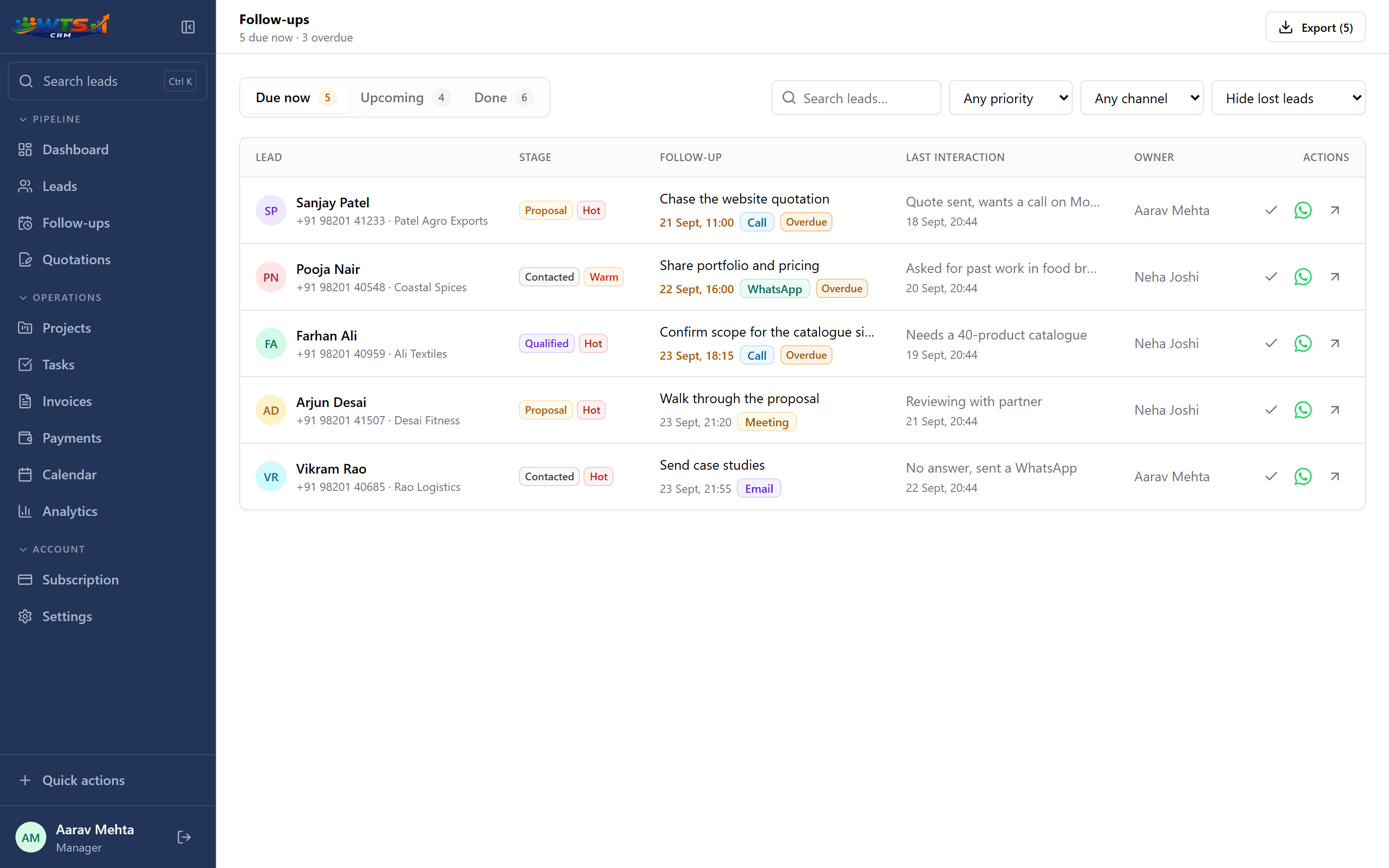
How a freelancer uses WTS CRM
Log the enquiry
Name, number, what they want and roughly what they can spend.
Book the next step
A dated follow-up for the call, the portfolio or the quote.
Quote and win
Send the quotation link, chase it once or twice, and mark the lead Won.
Do the work
Keep project notes and a few tasks on the client, so nothing agreed on a call is forgotten.
Invoice and get paid
Raise the invoice from the client, share it by link, and record payments as they arrive.
A CRM that earns its place in your day
A freelancer usually does not need enterprise sales automation. You need to know who is interested, what you promised, when to follow up and whether the eventual invoice was paid.
That makes speed and clarity more important than dozens of configurable screens. Add an enquiry, write the context and schedule the next action while the conversation is fresh. Still running everything from a spreadsheet? Here is when a sheet stops being enough.
What to check before choosing a freelancer CRM
Trial each candidate with your current work rather than sample data, and avoid paying for team features you will not use. If your priority is email marketing, advanced automation or a large app marketplace, compare broader platforms too, such as HubSpot; choose on the workflow you will use every week.
- Import from Excel or CSV
- Fast lead and note entry
- Dated, prioritised follow-ups
- Simple pipeline stages
- Client and project continuity
- Quotations and GST invoicing
- Partial-payment and balance tracking
- Easy data export
Running a one-person agency
A solo agency owner switches between selling, delivery and collections all day. The useful information is rarely missing; it is spread across calls, WhatsApp, email and memory while client work takes priority. A solo CRM should answer three questions at a glance: who needs a response, what did we discuss, and what money is still due?
Choose something that works for one person today but supports clear ownership and roles when you hire. In WTS CRM, moving from Solo to Team keeps every record and adds seats and roles.
Freelancers who use it
Web developers and designers
Scope-heavy enquiries, advances and final payments. Running a studio with others? See CRM for web development agencies.
Digital marketers and SEO freelancers
Monthly retainers and a steady stream of small enquiries.
Consultants and coaches
Long conversations before a proposal. See CRM for consultants.
Photographers, writers and other creatives
Quote, deliver, invoice, then chase the balance.
What changes when it is all in one place
- One list of enquiries instead of chats, notes and a spreadsheet.
- A reminder for every quote you promised to chase.
- Invoices raised in minutes, with GST or without.
- At a glance: who has paid, who part paid and who still owes you.
Priced for a one-person business
Solo is ₹999 a month for the complete CRM (leads, follow-ups, quotations, projects, invoices and payments) with no client limit. If you only need leads and follow-ups, Starter is ₹499 for up to 100 clients and leads.
Solo
₹999 / month
- One owner workspace
- Unlimited clients and leads
- Projects and task tracking
- Quotations and GST invoices
- Payment records and receivables
- All core CRM features
The trial unlocks every feature for 3 days and asks for no card. Choose a plan only when it ends.
Frequently asked questions
Is a CRM useful for a solo freelancer?
Yes, once you handle several enquiries at a time or sales that take more than one conversation. It gives you a reliable next-action list without any team setup.
Can I bring in my existing leads?
Yes. Import leads from CSV or Excel so you do not start again from zero.
Can I send GST invoices as a freelancer?
Yes. Raise a GST invoice against any client, share it by link, and record full or part payments as they arrive.
Do I need to be registered for GST to use it?
No. Add your GSTIN in settings if you have one; if you do not, switch GST off on the invoice.
What should an Indian freelancer check in a CRM?
Alongside lead management, check GST invoicing, INR pricing, payment tracking, data export and whether the product is simple enough to maintain alone.
Can I add a team later?
Yes. Team plans add seats, roles and assignment when you are ready to share the pipeline, and your existing records stay in place.