
CRM for web agencies
CRM for web development and web design agencies
A website enquiry is really a scope question: how many pages, which platform, what budget, by when. WTS CRM keeps those answers on the lead, chases the proposal, and carries the same record into the build, the advance invoice and the final payment.
What goes wrong between enquiry and launch
Enquiries without a scope
“How much for a website?” arrives with no page count, platform or budget, and the answers end up scattered across calls and chats.
Proposals chased from memory
The quote goes out, the client goes quiet, and nobody is sure whether it was followed up.
Scope lost at hand-off
Whoever sold the site knows what was promised; whoever builds it gets a one-line brief.
Advance received, balance forgotten
The advance is paid, launch slips, and the final invoice goes out weeks late or not at all.
Built around how web projects are sold
Scope on the lead
Add custom fields for what you always ask, such as site type, page count, platform and deadline. They are searchable and exported with the lead.
Website quotations
Line items for design, development, hosting or maintenance, each with its SAC code and GST rate, shared as a link the client can accept online.
Proposal chasers
Sending the quotation books a follow-up, and you get an email the first time the client opens it.
Projects by service type
Website, mobile app, SEO or maintenance projects with a budget, a due date and a status from Proposal to Delivered.
Tasks for the build
Content collection, design review, staging and launch as tasks with owners, priorities and due dates on the calendar.
Milestone billing
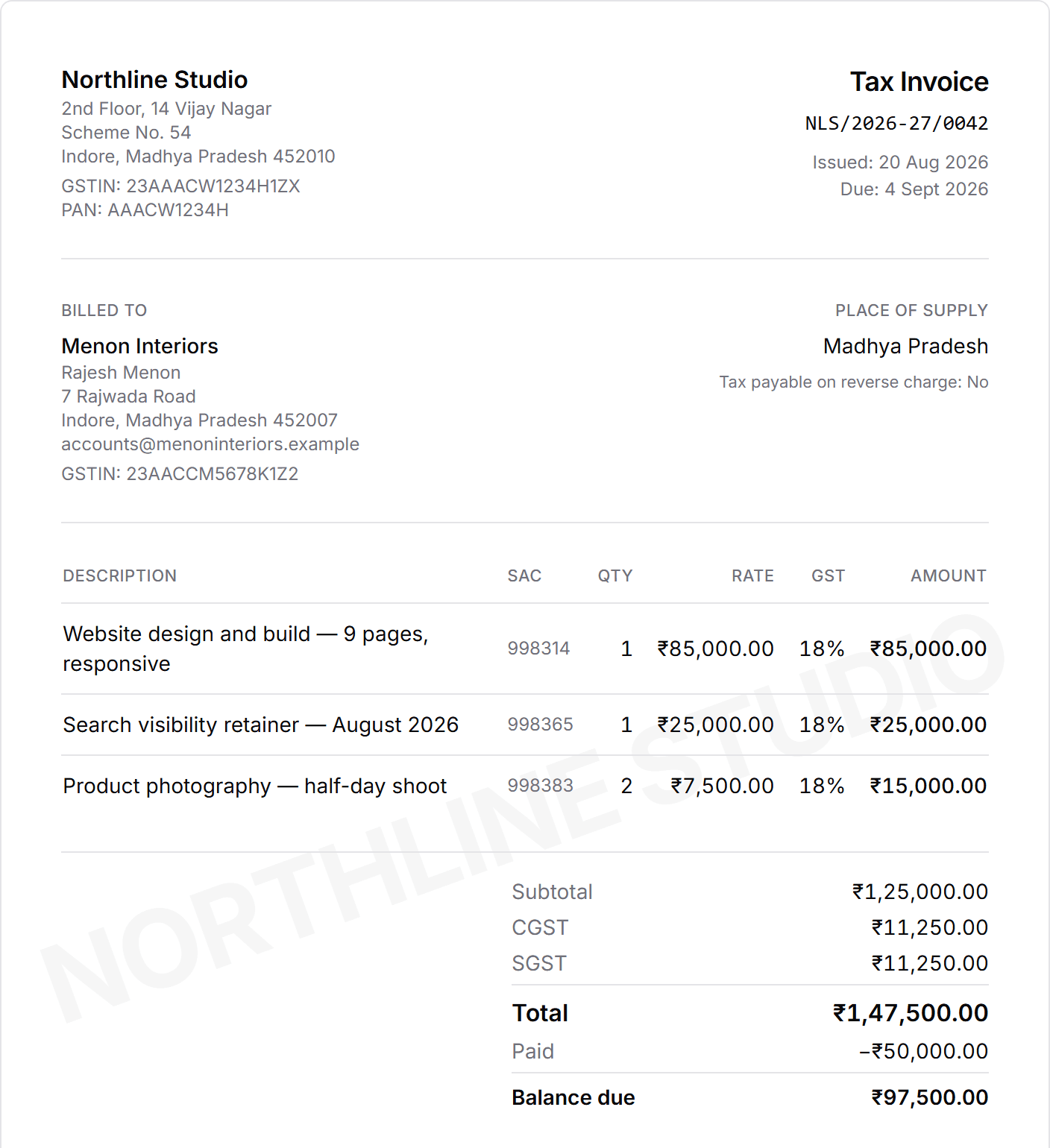
Convert the accepted quotation into a GST invoice, record the advance as a part payment, and send the balance reminder on WhatsApp.
One invoice, advance and balance
From enquiry to launch
Use stages that reflect buying progress rather than every internal activity.
Capture the enquiry
From your own website’s contact form, a call or a referral, with site type, goals and budget range noted.
Discovery and proposal
Book the discovery call and then the proposal follow-up as dated next steps.
Send the quotation
Share it as a link; a chaser is booked and you are told when it is opened.
Win and kick off
Mark the lead Won, open a website project and assign the first tasks.
Build and review
Track tasks and client notes on the project until it is delivered.
Invoice every milestone
Raise GST invoices and record advance, milestone and final payments.
What to test before choosing a CRM
Run a representative project through the trial. Check whether your team can find the latest scope note, identify the next sales action and understand what has been invoiced without opening several systems.
Specialist development workflows may still belong in dedicated issue-tracking or source-control tools. The CRM should own the customer and commercial story rather than pretend to replace every delivery tool. For the wider agency picture, including teams that also sell marketing, see CRM for agencies.
Who it fits
Web design studios
Small teams selling brochure sites, landing pages and redesigns.
Development agencies
Custom builds, web apps and e-commerce, where scope and milestones matter most.
Shopify and WordPress specialists
A steady flow of similar enquiries that need quick quoting and firm follow-up.
Freelance web developers
Working alone? The CRM for freelancers covers the same flow for one person.
What changes for a web agency
- Scope and budget from the first call are still there at kick-off.
- No proposal waits more than a few days for a nudge.
- Advance, milestone and final payments are recorded against one invoice, with the balance always visible.
- Maintenance clients stay in the CRM after launch instead of in someone’s head.
What it costs a web agency
Quotations, projects and invoices come with Solo (₹999 a month for one person) and Team (₹2,499 with 5 seats). Most studios with a designer and a developer start on Team.
Team
₹2,499 / month
- 5 seats
- Owner, admin and member roles
- Lead, task and follow-up assignment
- Team activity dashboard
- Unlimited clients and leads
- Projects, quotations, invoices and payments
The trial unlocks every feature for 3 days and asks for no card. Choose a plan only when it ends.
Frequently asked questions
Can WTS CRM track website projects after a lead is won?
Yes. Won leads become clients with related projects, tasks, notes and billing records.
Can it handle advance and milestone payments?
Yes. Record each payment against the invoice by UPI, bank transfer, cash or cheque; the invoice shows Part paid and the remaining balance until it is cleared.
Can enquiries from our own website’s contact form come in automatically?
Yes. Point the form at your workspace’s lead-capture endpoint (the key is in Settings) and each submission arrives as a new lead. It is a one-time change to the form, and you can test it from Settings. See website lead capture.
Can we manage maintenance (AMC) clients?
Yes. Track each maintenance contract as a project and raise its invoice each period. Invoices are not generated on a schedule automatically, so book a follow-up for each renewal.
Does it replace our project-management or issue-tracking tool?
No. It tracks projects, tasks and client notes at the level an agency owner needs; detailed development work may still belong in your issue tracker.