
Sales pipeline software
A simple sales pipeline for small businesses
A pipeline earns its keep when it shows two things at a glance: where each deal stands, and which ones have stopped moving. WTS CRM puts every lead on a stage board, flags the cards that have sat too long, and ties a dated follow-up to each one.
Where a small-business pipeline breaks down
The pipeline lives in someone’s head
The owner knows roughly which deals are close. Nobody else does, and nothing is written down when they are away.
Every deal looks the same
A list of names does not show which enquiry is waiting on a proposal and which was only asking about price.
Stalled deals go unnoticed
A quote sent three weeks ago looks exactly like one sent yesterday until someone counts the days.
Targets are guesswork
Without a stage on each deal and a total for the quotes still open, “how much is in the pipeline?” gets a different answer every time it is asked.
How the pipeline works in WTS CRM
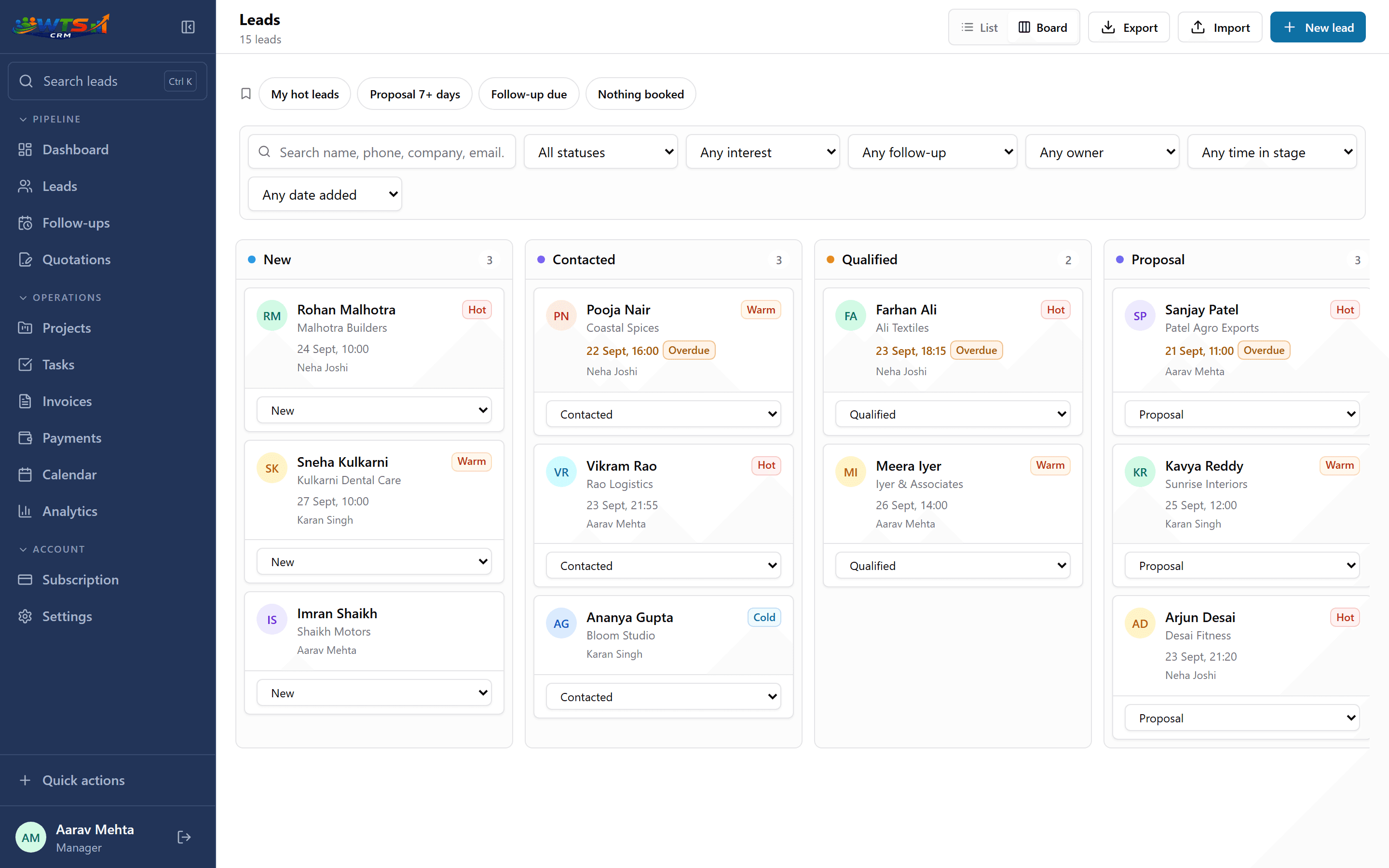
A board you can drag
Leads sit in columns by stage. Drag a card into the next column when the deal moves, or change the stage from the card itself on a phone.
Six clear stages
New, Contacted, Qualified, Proposal, Won and Lost. Everyone uses the same stages, so a report means the same thing across the team. Here is how a stage differs from a status.
Stuck deals are flagged
A card that has sat in its stage for seven days or more says so, and the Proposal 7+ days view lists every quote still waiting on a decision.
A next step on every card
Each card shows its next follow-up and flags an overdue one. Moving a lead to Contacted, Qualified or Proposal books one for you; the follow-up queue has the detail.
Temperature and open value
Rate each lead hot, warm or cold. The dashboard’s Open pipeline figure totals the quotations your customers have still to answer, and counts the Proposal leads with no quote in front of them.
A reason for every loss
Moving a lead to Lost asks why. Analytics then show how leads move through the stages and which reasons come up most.
The pipeline board
A weekly pipeline review in ten minutes
A pipeline stays honest only if someone reads it. This is short enough to do every Monday.
Start at Proposal
These deals are closest to money. Check that each one has a follow-up booked this week.
Clear the flags
Open every card flagged for its days in stage. Book a next step or close it.
Qualify or drop
Move Contacted leads forward, or mark them Lost with a reason. A short honest pipeline beats a long hopeful one.
Check New
Every new enquiry should have an owner and a first contact. See lead management software for how leads arrive.
Read the losses
Once a month, look at the lost reasons in analytics and decide what to change.
How many pipeline stages does a small business need?
Fewer than most tools offer. A stage should mark a real change in how close the buyer is to deciding: you have spoken, they fit, they have a price. Anything finer than that is activity, and activity belongs in notes and follow-ups.
WTS CRM uses six stages for that reason, and they are fixed: you cannot rename them or run several pipelines side by side. If your sale has a step they do not cover, record it with a tag, a custom field or the temperature.
- New: the enquiry has arrived and nobody has replied yet
- Contacted: you have spoken or messaged
- Qualified: the need, budget and timing fit
- Proposal: a price or quotation is with the buyer
- Won or Lost: the decision, with a reason when lost
What it does not do
WTS CRM does not score win probability or produce weighted forecasts, and it does not track several deals separately under one company record. It shows where each lead stands and the total of the quotations still open.
If you send formal quotes, the Proposal stage connects to GST quotations on Solo and above: sending one books a chaser, and you are told when the client opens it.
Who it suits
Small sales teams
One shared board, with each rep’s deals and overdue follow-ups visible to the manager. See CRM for small sales teams.
Agencies
Proposal-led sales where the deal becomes a client project. See CRM for agencies.
Consultants
A handful of high-value conversations that each need a clear next step. See CRM for consultants.
Owner-led businesses
One person selling between everything else, who needs the board to do the remembering.
What changes when the pipeline is visible
- Every deal sits in a stage column, so the whole pipeline fits on one screen.
- Deals that have stopped moving are flagged on the board, not discovered at month end.
- Each stage change books the next follow-up, so progress does not depend on memory.
- Lost deals carry a reason, so you can see whether price, timing or a competitor is costing you work.
A sales pipeline from ₹499 a month
The pipeline board, stages and follow-ups are in every plan, starting with Starter at ₹499 a month for one person and up to 100 clients and leads. Solo (₹999) removes the limit and adds quotations and invoices; Team (₹2,499) shares one pipeline across 5 seats.
Starter
₹499 / month
- One user workspace
- Up to 100 clients and leads
- Lead stages, temperature and notes
- Follow-up dates and reminders
- Basic CRM dashboard
The trial unlocks every feature for 3 days and asks for no card. Choose a plan only when it ends.
Frequently asked questions
What is sales pipeline software?
Software that shows every open deal by the stage it has reached, so you can see what is progressing, what is stuck and what needs a follow-up. WTS CRM adds the follow-up schedule to each deal and carries a won lead on as a client.
Can I change the pipeline stages?
No. The six stages (New, Contacted, Qualified, Proposal, Won and Lost) are the same in every workspace. Use tags, custom fields and saved views for anything specific to your business.
Can I see my deals as a list instead of a board?
Yes. The same leads are available as a sortable list, and the filtered list exports as CSV.
How do I know which deals are stuck?
Cards show how long a lead has sat in its stage once that reaches seven days, the Proposal 7+ days view lists stalled quotes, and the morning email includes leads with nothing booked for 14 days.
Can my team share one pipeline?
Yes, on Team and Agency. Owners and admins see every lead; members see the leads assigned to them.
Does it track deal value?
Through quotations. A lead has no amount of its own; once you send a quotation (Solo and above), its total counts towards the Open pipeline figure on the dashboard until the client answers. There is no weighted forecast.