
Lead follow-up software
Follow-up software that never lets a lead go quiet
Most leads are not lost because they were a bad fit. They are lost because the next call was never booked. WTS CRM turns follow-up from a memory task into a daily queue, with a reminder in your inbox every morning.
Why follow-ups slip
Reminders nobody else can see
A note in a diary, a personal calendar or a starred chat is invisible to the rest of the team.
Urgent work wins
On a busy day, delivery and fire-fighting come first, and the sales callback quietly moves to tomorrow.
The next step is never booked
The call ends with “call me next week”, and nothing records which day, or who will call.
Nobody notices a lead going cold
A lead untouched for two weeks looks exactly like one called yesterday in a list of names.
How WTS CRM keeps follow-ups moving
A queue, not a list
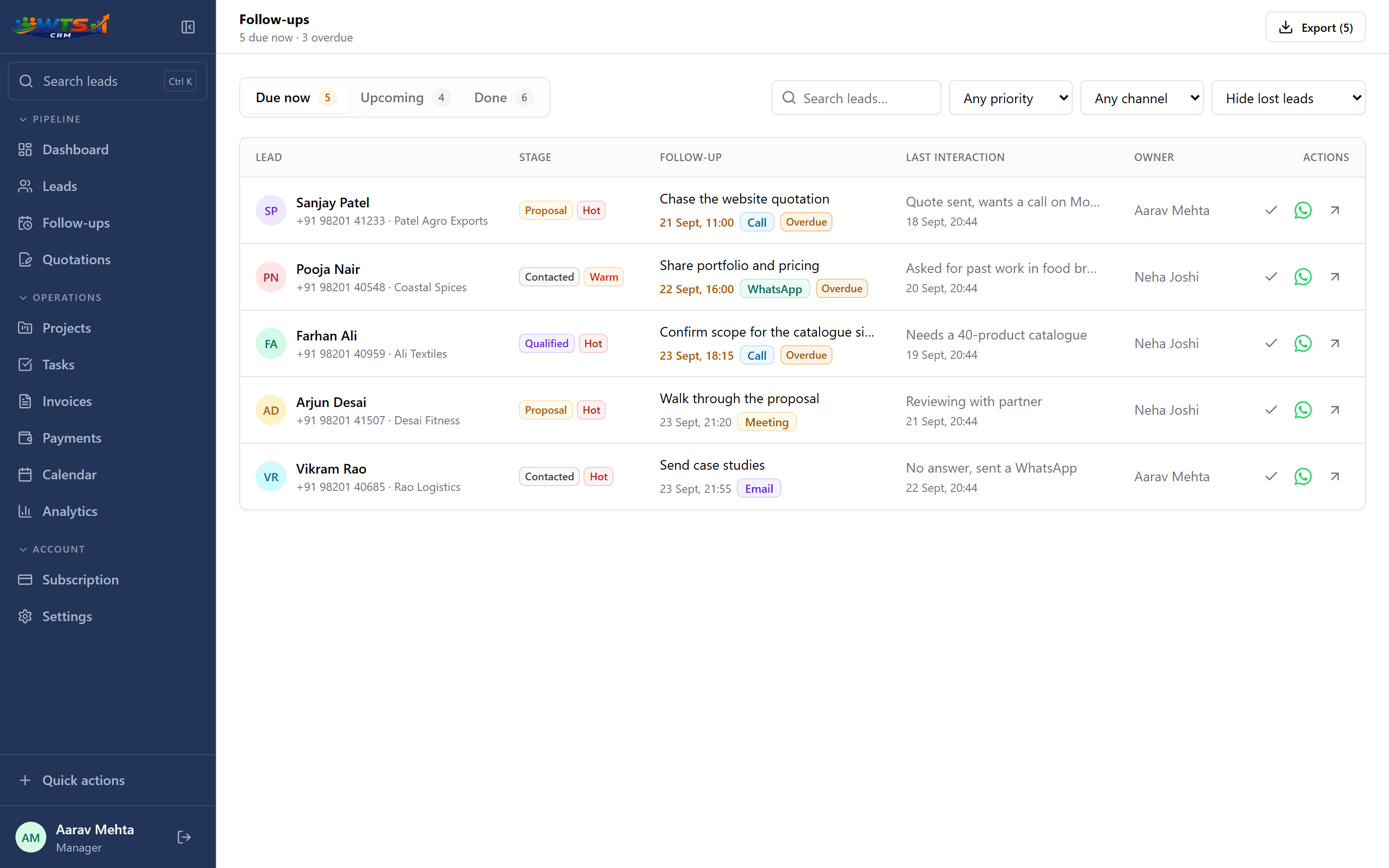
Follow-ups sit under Due now, Upcoming and Done, with overdue ones flagged and filters for priority, channel and owner.
Booked when the stage changes
Move a lead to Contacted and a follow-up is booked three days out; Qualified books one in two days, Proposal in three. Book one yourself and the automatic one steps aside.
A reminder every morning
At 9:00 each morning, everyone with something due gets an email of their overdue and due-today follow-ups, plus leads with nothing booked for 14 days.
One-tap call results
Close a follow-up as No answer, Call back later, Interested or Not interested. Call back books tomorrow; Not interested moves the lead to Lost and asks why.
Channels and priority
Mark each follow-up as a call, WhatsApp, email or meeting with a priority, and open WhatsApp from the queue with a saved message template.
Quotation chasers
Sending a quotation books a follow-up. When the client first opens the quote, that follow-up moves to now at high priority.
The follow-up queue
A follow-up routine that holds up on busy days
Consistency matters more than clever automation. This takes a few minutes a day.
Start with overdue
Clear or reschedule yesterday’s misses before anything new.
Work Due now
Call, message or email in priority order, straight from the queue.
Log the result
Pick the call result and add a line of notes while the conversation is fresh.
Book the next step
Every conversation ends with a dated follow-up, or a reason the lead is closed.
Check what is going cold
Once a day, open the Nothing booked view or the going-cold list in the morning email.
Measure the habit, not just the pipeline
Pipeline stages tell you where a lead is. Follow-up records tell you whether anyone is moving it forward. Review overdue work, time since last contact and ownership gaps alongside wins and losses.
In WTS CRM, analytics show logged call results by person (how many were reached and how many were interested) next to pipeline movement, so a manager can see whether follow-ups are happening, not only whether deals closed. For the conversations themselves, read how to follow up without sounding pushy.
Who needs a follow-up system most
Small sales teams
A manager needs to see every rep’s overdue follow-ups without asking. See CRM for small sales teams.
Agencies chasing proposals
Proposals and quotations usually need two or three nudges before a decision. See CRM for agencies.
Freelancers
You are the salesperson and the delivery team, so let the morning email do the remembering. See CRM for freelancers.
What changes when follow-ups are tracked
- Every open lead has a dated next step, and the ones that do not are one tap away.
- Overdue follow-ups are flagged instead of buried.
- The outcome of each call is logged as you close it, with the next step filled in.
- Managers see follow-up discipline across the team, not just the pipeline.
Follow-up tracking from ₹499 a month
Follow-ups, stage-based booking and the morning email are in every plan, starting with Starter at ₹499 a month for one person. Team (₹2,499) adds 5 seats so a manager can see everyone’s queue; quotation chasers come with the quotations on Solo and above.
Starter
₹499 / month
- One user workspace
- Up to 100 clients and leads
- Lead stages, temperature and notes
- Follow-up dates and reminders
- Basic CRM dashboard
The trial unlocks every feature for 3 days and asks for no card. Choose a plan only when it ends.
Frequently asked questions
What is lead follow-up software?
It connects each prospect with a dated next action, reminders, notes and an owner, so opportunities do not depend on anyone’s memory.
Can managers see overdue follow-ups?
Yes. Owners and admins see due and overdue follow-ups across the whole team; members see their own.
Are follow-ups created automatically?
Some are. Moving a lead to Contacted, Qualified or Proposal books the next follow-up at 10:00 your time, and sending a quotation books a chaser. You can always book, move or cancel one yourself.
Will I be reminded if I do not open the app?
Yes. Each morning at 9:00, anyone with overdue or due-today follow-ups, or leads going cold, gets an email listing them with a link back to each lead.
Can I follow up on WhatsApp from the CRM?
Yes. Open WhatsApp from any follow-up with one of your saved templates filled in; you review and send the message yourself. It is not a bulk-messaging tool.
Can I export my follow-up list?
Yes. The filtered list exports as CSV.