
CRM with project management
CRM with projects and tasks built in
Most CRMs stop at “won”, and the project starts again from a blank page in another tool. In WTS CRM a won lead carries on as a client with projects and tasks on the same record, so what was promised in the sale is in front of the people delivering it.
What breaks between the sale and the work
The brief is typed out again
Everything learned during the sale is summarised into a new project in a different tool, and details are lost on the way.
Promises made on a call
The client was told “two rounds of revisions” by whoever sold the job. The person doing the work never heard it.
Two tools, two versions of the client
The CRM says the deal is won. The project tool says the job is late. Neither shows whether the invoice went out.
Tasks without owners
A to-do list in a group chat has no due dates, and “someone” was going to send the content reminder.
Projects and tasks in WTS CRM
Projects on the client
Each project has a service type (website, mobile app, SEO, ads, branding, maintenance or other), a description, a budget, start and due dates and an owner.
A status you can scan
Projects are Proposal, Active, On hold, Delivered or Cancelled, so the list shows what is live and what is waiting.
Tasks with owners
Tasks carry an assignee, a priority from Low to Urgent, a due date and a status: To do, In progress, Blocked or Done. They can belong to a project or directly to a client.
A calendar of what is due
Task due dates and follow-ups appear on the calendar, and the dashboard lists the project tasks coming up beside today’s follow-ups.
The sales history beside the work
Open the client and the notes, calls and quotation from the sale are on the same client record as the project.
Billing on the same record
Quotations and GST invoices can be linked to the project, with payments recorded against them. See CRM with invoicing.
Sales and delivery on one screen
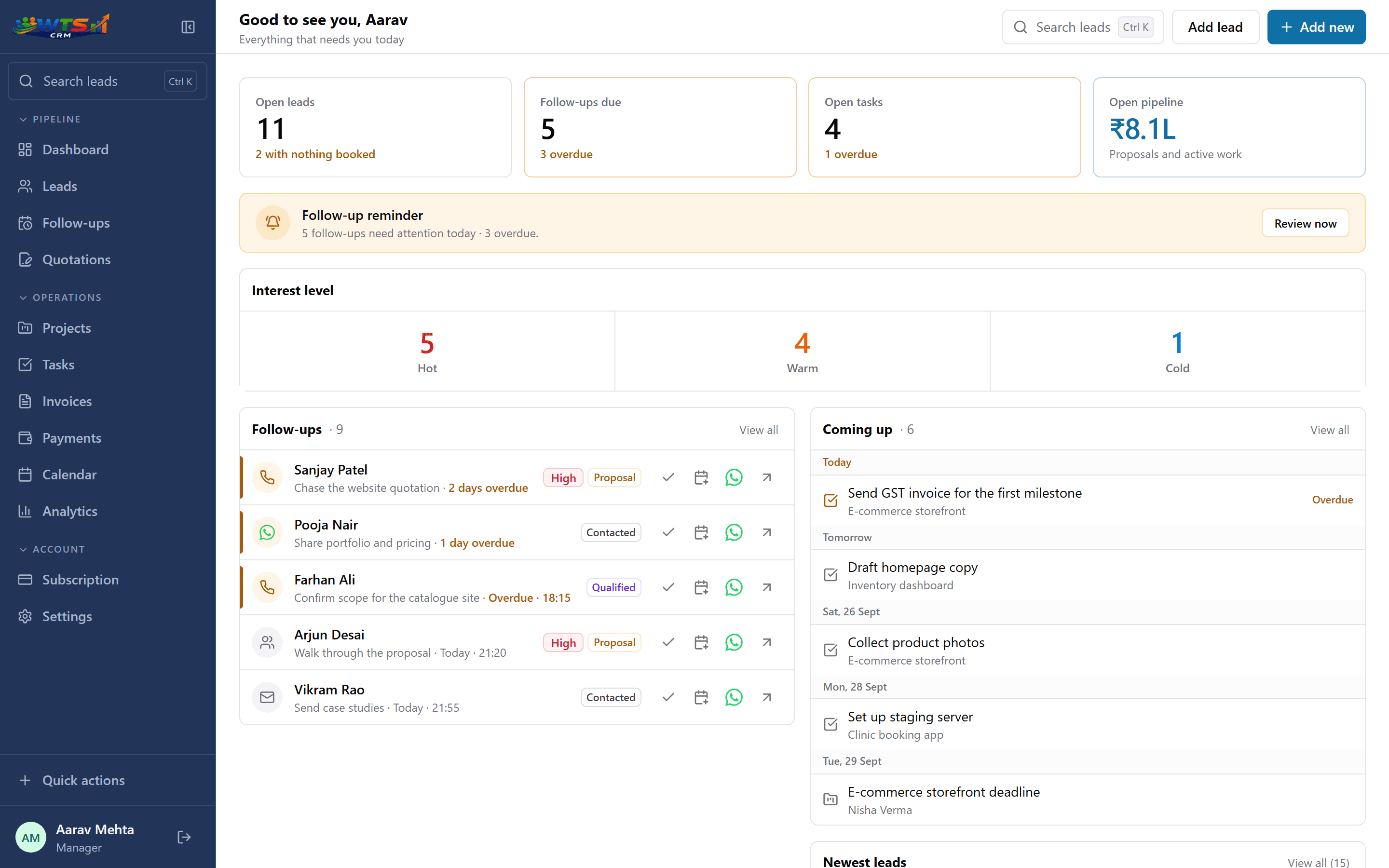
From won lead to delivered project
These are records you move through, not an automatic chain, and each step takes a minute.
Mark the lead Won
The lead carries on as a client, with every note from the sale still attached.
Open the project
Choose the service type, then set the budget, the due date and who owns it.
Break it into tasks
Add the steps, give each an assignee, a priority and a due date.
Work the list
Move tasks to In progress, Blocked or Done, and add client notes as things change.
Deliver and invoice
Mark the project Delivered, raise the GST invoice and record the payment.
When a CRM with projects is enough, and when it is not
WTS CRM tracks projects at the level an owner or account manager needs: what is live, who is doing what, what is due and what is blocked. For client work with a clear scope and a short task list, that replaces a separate project tool.
It has no Gantt charts, time tracking, task dependencies or sprint boards. Teams that depend on those keep a specialist tool for the build and use the CRM for the client and commercial story.
- Enough for: client projects with a short task list and one or two people per job
- Enough for: retainers and maintenance contracts tracked month by month
- Not built for: time sheets, resource planning or software sprints
Who it suits
Agencies
Sales and delivery handled by a small team that shares clients. See CRM for agencies.
Web design and development studios
Builds with a scope, milestones and a launch list. See CRM for web development agencies.
Teams that assign work
Managers who hand out leads and tasks and need to see what is overdue. See CRM for small sales teams.
Solo operators
One person who wants a short task list on each client, not a second app to keep up to date.
What changes when delivery sits beside the sale
- The scope agreed during the sale is still on the record at kick-off.
- Every task has an owner, a priority and a due date.
- An owner can see live projects, blocked work and overdue tasks without calling a meeting.
- The invoice is raised from the same client the work was done for.
What it costs
Projects and tasks come with Solo (₹999 a month for one person) and every plan above it. Team is ₹2,499 for 5 seats, with roles and task and lead assignment; extra seats are ₹399 each. Starter covers leads and follow-ups only.
Team
₹2,499 / month
- 5 seats
- Owner, admin and member roles
- Lead, task and follow-up assignment
- Team activity dashboard
- Unlimited clients and leads
- Projects, quotations, invoices and payments
The trial unlocks every feature for 3 days and asks for no card. Choose a plan only when it ends.
Frequently asked questions
Does a won lead become a project automatically?
No. When a lead is won you open a project on that client, which takes a few fields. The client’s notes and history are already there, so nothing is typed twice.
Can I assign tasks to teammates?
Yes, on Team and Agency. Each task has an assignee, and members see the work assigned to them.
Does it replace a separate project management tool?
For simple client work, often yes. It does not include Gantt charts, time tracking or task dependencies, so teams that need those keep a specialist tool alongside.
Can I track a project budget?
Each project has a budget amount, and quotations and invoices can be linked to it, so you can see what has been billed and paid. There is no time or cost tracking against the budget.
Can I manage retainers or maintenance contracts?
Yes. Track each contract as a project and raise its invoice each period. Invoices are not created on a schedule automatically, so book a follow-up for each renewal.
Which plans include projects and tasks?
Solo, Team and Agency. Starter covers lead tracking and follow-ups.