
Payment tracking software
Client payment tracking software for small businesses
Most small businesses know what they billed this month. Far fewer can say, without opening a bank statement, how much is still owed, by whom and for how long. WTS CRM keeps every invoice and every payment against it in one place, so outstanding and overdue money is a number on a screen, not an evening with a spreadsheet.
Why money owed is hard to see
The balance lives in a bank statement
An advance by UPI, a cheque for half the balance, cash at handover: working out what one client still owes means matching all three by hand.
Overdue looks the same as not due
A list of unpaid invoices does not say which ones are late and which are simply not due yet, so the urgent ones wait.
Nobody remembers to chase
Reminding a client to pay is awkward, so it happens when someone notices, which is usually weeks after the due date.
Sales cannot see payment status
The person talking to the client about new work has no idea the last invoice is still open.
Payment tracking in WTS CRM
Payments are recorded against invoices, so the ledger and every balance always agree.
One screen for money owed
The Payments screen shows what is outstanding across every open invoice, how much of it is overdue, what came in during the period you pick and the share of billed money already collected.
Ageing at a glance
Unpaid balances are grouped into Not due yet, 1–30 days, 31–60 days and 60+ days late, with the count and amount in each bucket.
Part payments, any method
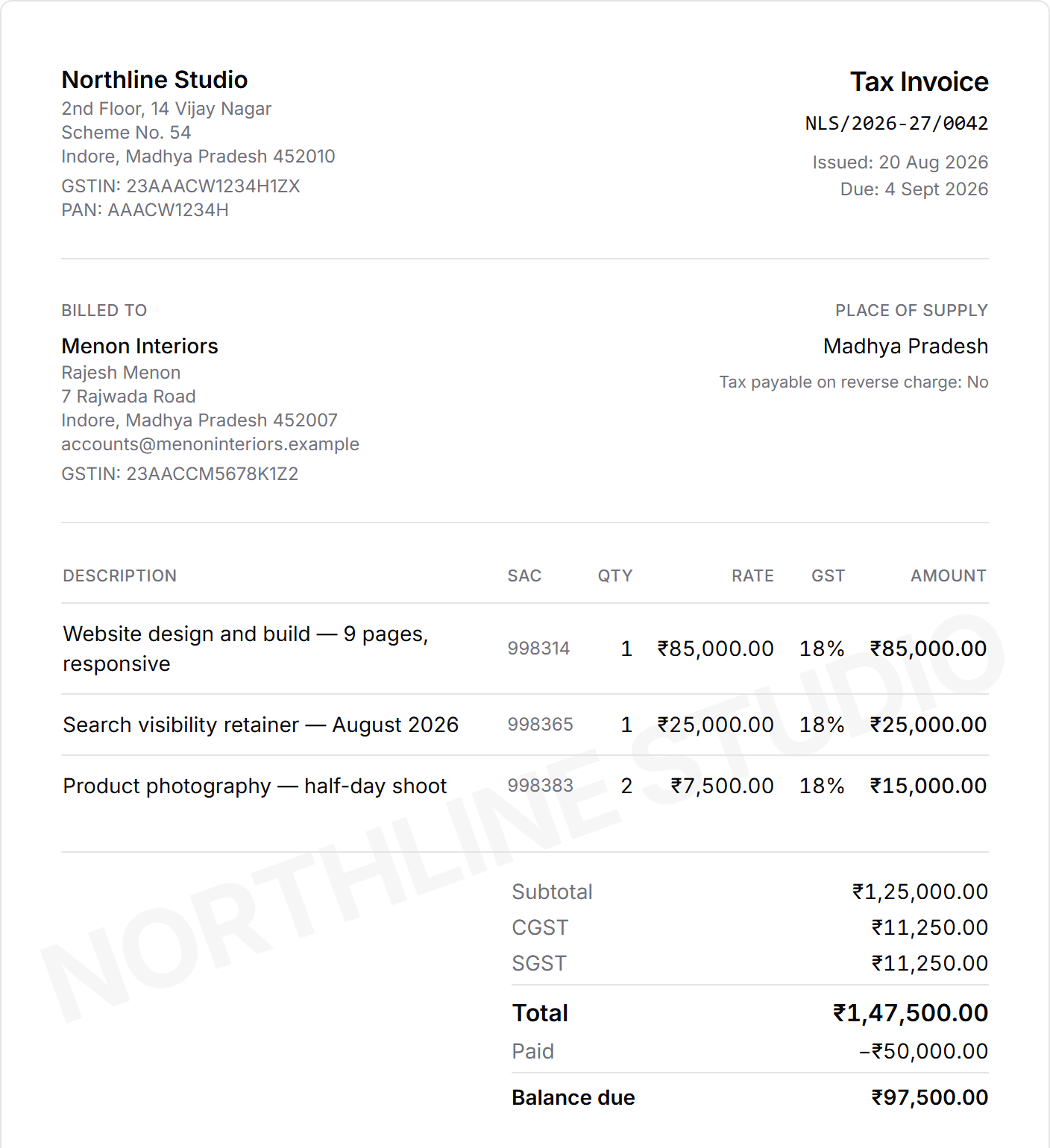
Record each payment with its date, amount and method (UPI, bank transfer, cash, cheque or other), plus a reference. The invoice moves to Part paid, then Paid.
Reminders that go out on their own
Switch on reminder emails and clients with an overdue invoice are emailed at 3, 7 and 14 days late, signed by your business. A separate switch sends one friendly note a few days before the due date.
WhatsApp in one click
An overdue invoice has a reminder button that opens WhatsApp with the amount, due date and invoice link already written. See payment reminder messages.
Export for your accountant
Download the payments received in any period as CSV, with the date, amount, method, invoice, client and reference on each row.
An invoice with part payments recorded
A weekly routine that keeps money moving
Raise the invoice
Convert the accepted quotation into a GST invoice with a due date, or raise one directly from the client.
Record the advance
Log it the day it lands. The client record and the Payments screen update together.
Let reminders run
Turn on the overdue and due-soon emails once in Settings; they go out every morning without anyone remembering.
Check ageing each Monday
Start with the 60+ days bucket, then 31–60. Call the oldest balances; the newest can wait for the email.
Record the rest
Every later payment, by any method, against the same invoice until the balance is cleared.
Hand over the export
At month end, download the received payments as CSV for your accountant.
A payment tracker sheet or a CRM?
A spreadsheet works until there are more than a handful of open invoices.
| Job | Spreadsheet | WTS CRM |
|---|---|---|
| Balance after part payments | A formula someone has to keep right | Worked out from the payments recorded |
| Which invoices are late | Sort by due date and compare with today | Marked Overdue, with days late |
| How long money has waited | Built by hand, if at all | Ageing buckets on the Payments screen |
| Reminding the client | Someone remembers | Automatic emails, or WhatsApp in one click |
| Seeing it on the client record | A separate file | Beside the client’s leads, quotes and notes |
| Export for the accountant | The sheet itself | CSV of payments for any period |
What payment tracking software should show you
Whatever you use, it should answer three questions in under a minute: how much is owed in total, how much of that is late, and who has owed the longest. If it takes longer than that, the answer gets checked once a month instead of once a week, and late money stays late.
- A balance per invoice that updates with every part payment
- A clear difference between overdue and not yet due
- How long each balance has been waiting
- A reminder that does not depend on someone remembering
- The payment status on the client’s own record
What it does not do
WTS CRM records payments; it does not collect them. Clients pay you by UPI, bank transfer or any method you already use, and you record the payment against the invoice. Payments are not read from your bank account, and a recorded payment is not edited later: to correct one you remove it and enter it again, so the ledger and the balance never disagree.
It is not accounting software either. There are no ledgers, expenses or bank reconciliation, and no recurring invoices. For how invoices are raised, see CRM with GST invoicing; for asking for money up front, see how to request an advance.
Who tracks payments this way
Agencies billing in milestones
Advance, mid-project and handover invoices on one client. See CRM for agencies.
Contractors and installers
Running payments at each stage of a job. See CRM for contractors.
Freelancers
One person who sells, delivers and has to chase. See CRM for freelancers.
CA firms and consultants
Fees billed in stages and collected late. See CRM for CA firms.
What changes when payments are tracked in the CRM
- Outstanding, overdue and collected totals on one Payments screen.
- Ageing buckets show how long unpaid money has been waiting.
- Advances and part payments update the balance the moment they are recorded.
- Overdue clients get a reminder by email automatically, or on WhatsApp in one click.
Payment tracking from ₹999 a month
Invoices, payment records, ageing and reminders come with Solo at ₹999 a month for one person, with no client limit. Team (₹2,499) adds 5 seats, so whoever talks to the client can see what they owe. Starter covers leads and follow-ups only.
Solo
₹999 / month
- One owner workspace
- Unlimited clients and leads
- Projects and task tracking
- Quotations and GST invoices
- Payment records and receivables
- All core CRM features
The trial unlocks every feature for 3 days and asks for no card. Choose a plan only when it ends.
Frequently asked questions
How do I track client payments in WTS CRM?
Record each payment against its invoice with the date, amount and method. The invoice shows Part paid or Paid and the remaining balance, and the Payments screen totals what is outstanding and overdue across every client.
Can it track partial payments?
Yes. Record as many payments against one invoice as you receive. The balance updates after each one, and the invoice is marked Paid when it reaches zero.
Does it send payment reminders automatically?
Yes, if you switch them on. Clients with an overdue invoice and an email address on file get a reminder at 3, 7 and 14 days late, and an optional note can go out a few days before the due date. WhatsApp reminders are sent by you, in one click from the invoice.
Can I see how long invoices have been unpaid?
Yes. The Payments screen groups unpaid balances into Not due yet, 1–30, 31–60 and 60+ days late, with the number of invoices and the amount in each.
Can clients pay online through WTS CRM?
No. WTS CRM records payments you receive; it does not process them. Your bank or UPI details can be printed on the invoice so the client knows where to pay.
Can I export payments for my accountant?
Yes. Download the payments received in any period as CSV, and the invoice register separately from the Invoices screen.