
CRM for consultants
CRM for consultants in India: track leads, proposals and client billing
Consulting work can feel easy to track until three or four conversations are happening at once. WTS CRM gives a consultancy one shared record per prospect and client, so the next action, the proposal and the invoice all sit in the same place.
Why consultancy pipelines fall behind
Leads live in calls and messages
A new enquiry comes in on WhatsApp or by call, then never comes back to the team unless someone remembers it.
Slow proposals create missed work
A quote is sent and then everybody waits for the client to reply, with no reminder when it goes cold.
Client work is tracked in too many places
The project, the proposal and the invoice each live in a different place, so the client record never feels complete.
How WTS CRM supports consulting work
Lead pipeline with ownership
Assign enquiries to the consultant or account lead responsible for the next reply, with the stage and next follow-up right beside it.
Quotation tracking
Turn a lead into a quotation and know when it was opened, accepted, rejected or expired without chasing in email.
Client and project records
A won enquiry becomes a client with the work, the proposal and the invoice history connected as one record.
Payment follow-up
Record invoices and partial payments, then send a reminder when the balance is still open.
The consulting pipeline on one screen
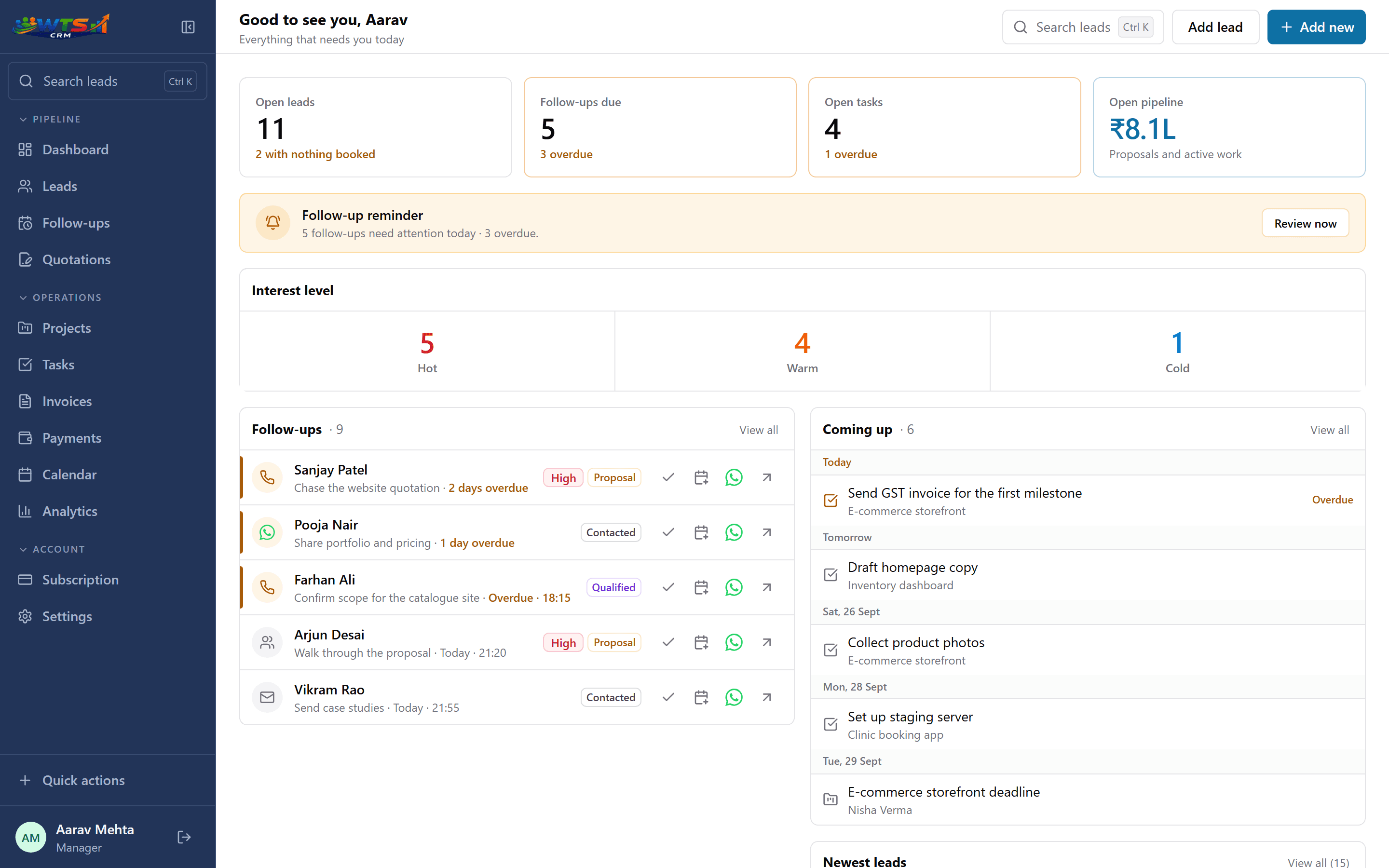
A consulting workflow with fewer gaps
Capture the enquiry
Add new leads by hand, from the website or from a source like WhatsApp, with the service need and budget captured at the start.
Respond and qualify
Talk to the prospect, note the outcome and move the lead to Qualified or Proposal.
Send the quotation
Create the proposal from the lead and track whether the client has opened it and replied.
Deliver and invoice
When the work is accepted, turn it into a client project and a GST invoice without leaving the CRM.
Consulting teams need better visibility than a spreadsheet
A consultant may be juggling client notes, proposal dates and invoicing in one email thread and a spreadsheet, which makes it hard to know who is carrying the next action. A CRM brings the process into a visible workflow.
The point is not to make the delivery process heavier; it is to make the next action obvious, the proposal visible and the billing tied to the client record.
Useful for solo consultants and small advisory firms
Whether you are one consultant or a small firm, the workflow is the same: receive the lead, respond quickly, track the proposal and update the client when the work is delivered and paid. The right system reduces missed follow-ups without adding much complexity.
What changes for a consultancy
- Every enquiry has an owner, stage and next follow-up.
- A proposal is tracked until the client replies or signs.
- The client record keeps projects, quotations and invoices together.
- You can see which consultants are carrying the hottest opportunities.
A simple consulting CRM for a small practice
Solo (₹999 a month) covers a single consultant, while Team (₹2,499) adds a few seats for account owners and admin visibility. See the pricing page for the current setup.
Solo
₹999 / month
- One owner workspace
- Unlimited clients and leads
- Projects and task tracking
- Quotations and GST invoices
- Payment records and receivables
- All core CRM features
The trial unlocks every feature for 3 days and asks for no card. Choose a plan only when it ends.
Frequently asked questions
Can a consultant use WTS CRM by themselves?
Yes. Solo consultants can track enquiries, proposals and invoices in one place without a large setup or admin overhead.
Can I see the client history and payments together?
Yes. The client record keeps the proposition, the history, the invoices and the remaining balance in one view.
Does it help with proposal follow-up?
Yes. WTS CRM lets you track quotation status and follow up on open or overdue proposals so they do not sit unchased.